Unlock the potential of your learning with Anki, a powerful digital flashcard application. This comprehensive guide delves into the intricacies of creating effective Anki flashcards, covering everything from the basic setup to advanced customization and troubleshooting. Discover how to leverage Anki’s features to enhance your memory retention and boost your learning efficiency across various subjects.
From designing optimized flashcards to mastering Anki’s spaced repetition algorithm, this guide provides practical strategies and techniques to maximize your learning experience. We will explore the nuances of different learning styles and the various ways Anki can be adapted to fit your individual needs. Prepare to transform your study habits with Anki’s versatile capabilities and optimize your learning journey.
Introduction to Anki
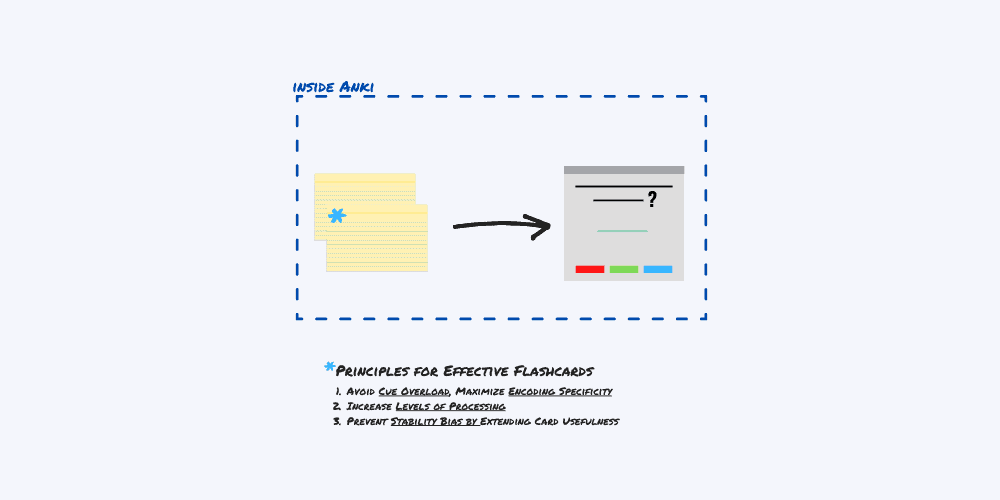
Anki is a free, open-source flashcard application designed to aid in memorization and learning. It goes beyond simple flashcards by offering advanced features for efficient and effective learning. Its user-friendly interface and customizable options make it a popular choice for students, professionals, and anyone seeking to improve their knowledge retention.Anki’s power lies in its ability to adapt to individual learning styles and paces.
It leverages spaced repetition, a scientifically proven technique, to optimize learning by presenting cards at intervals that maximize memory consolidation. This personalized approach ensures that information is revisited when it’s most needed, preventing forgetting and reinforcing understanding.
Anki’s Core Features for Digital Flashcards
Anki’s core functionality revolves around its digital flashcard system. It allows for the creation of cards with multiple types of information, such as text, images, audio, and video. This diverse representation of content caters to various learning styles and enhances comprehension. Importantly, the software is designed to track your progress, allowing you to monitor your learning effectiveness.
Basic Interface and Navigation
Anki’s interface is intuitive and user-friendly, designed for seamless navigation. The main components include a deck browser for managing your study materials, a card viewer for reviewing individual flashcards, and a settings panel for customizing options. This organized layout promotes efficient workflow and allows for quick access to necessary tools.
Installation and Setup
Anki is available for various operating systems, ensuring compatibility with a wide range of devices.
- Windows: Download the Anki installer from the official website. Run the installer and follow the on-screen instructions. The installation process is straightforward and typically completes within a few minutes. Post-installation, you’ll be prompted to configure Anki based on your preferences.
- macOS: Download the Anki installer from the official website. Double-click the downloaded file to launch the installer. Follow the prompts to complete the installation process. The macOS version generally mirrors the Windows version in terms of installation steps.
- Linux: Anki is often available through your distribution’s package manager. Consult your distribution’s documentation for specific instructions on installing Anki. If not available through a package manager, you may need to download the Anki executable and run it directly from the terminal.
The installation process typically involves downloading the appropriate installer for your operating system and following the on-screen instructions. Once installed, you can begin creating and using your digital flashcards. This accessibility ensures Anki is usable across different computer environments.
Creating Effective Flashcards
Creating high-quality flashcards is crucial for maximizing the effectiveness of Anki. A well-designed flashcard template, combined with clear and concise information, significantly improves retention and accelerates learning. This section details the best practices for crafting flashcards in Anki, covering various subject matters and incorporating multimedia elements.Effective Anki flashcards are more than just snippets of information; they are meticulously crafted tools for efficient learning.
The proper structure and inclusion of relevant multimedia elements are key to ensuring that the learning process is not only effective but also enjoyable.
Designing a Flashcard Template
A well-structured template is essential for creating consistent and effective Anki flashcards. A standardized format allows for easy review and facilitates a smooth learning experience. A template should be adaptable to various subjects and learning styles.
- Layout and Formatting: A simple, uncluttered layout is ideal. Use a clear separation between the front and back of the card. Use headings, subheadings, and bullet points to organize information logically. Font size and style should be easily readable, and colors can be used to highlight key concepts or terms. Ensure that the front and back are visually distinct.
- Optimal Spacing: Adequate spacing between elements prevents visual clutter and allows for better readability. Avoid cramming too much information onto a single card.
Clarity and Conciseness
The information on each flashcard should be clear, concise, and focused on the core concepts. Avoid extraneous details that may distract from the learning objective. Use precise language and avoid jargon or technical terms that the learner may not understand.
- Key Concepts: Focus on conveying the essential elements of the concept or topic. Avoid unnecessary explanations or examples that do not directly support the core concept.
- Precise Terminology: Use precise terminology and definitions. Define any unfamiliar terms or concepts clearly and concisely.
- Example Application: Include a concise example demonstrating the application of the concept. This can be a simple sentence, a brief scenario, or a visual representation.
Utilizing Anki Field Types
Anki offers various field types to accommodate different learning materials. Understanding and leveraging these types is crucial for creating versatile and engaging flashcards.
- Text Fields: These are essential for presenting definitions, explanations, and summaries. Use them to provide concise and accurate information.
- Image Fields: Images can greatly enhance understanding. Choose images that are relevant, high-resolution, and accurately represent the concept. Ensure images are clearly labelled with captions if necessary. For example, a historical photograph with a concise description of the event it depicts.
- Audio Fields: Audio can be invaluable for language learning or when memorizing pronunciations. Use clear and concise audio recordings for maximum benefit. For example, a recording of a foreign language phrase with its pronunciation guide.
Examples of Structured Flashcards
Here are examples of well-structured flashcards for different subjects:
| Subject | Front (Question) | Back (Answer) |
|---|---|---|
| History | Who was the leader of the French Revolution? | Maximilien Robespierre |
| Languages | Translate “hello” to Spanish. | Hola |
| Science | What is the formula for calculating acceleration? | a = (vf
|
Multimedia Use
Incorporating images and multimedia effectively enhances the learning experience. Visual aids and audio recordings can significantly improve comprehension and retention. The choice of media should be based on the specific subject matter and learning objectives.
- Images: Use images to illustrate concepts, represent objects, or depict processes. Ensure images are relevant, clear, and high-quality.
- Audio: Use audio to provide pronunciations, examples, or explanations. Ensure audio is clear and easily accessible.
Creating Flashcards for Complex Concepts
Complex concepts require a more detailed approach to create effective flashcards. Break down the concept into smaller, manageable parts. Use visual aids and examples to illustrate the different components. Ensure that the information is presented in a logical and sequential order. For example, when learning about the Krebs cycle, separate the individual steps into different cards, and provide images or diagrams to illustrate each stage.
Mastering Anki’s Features
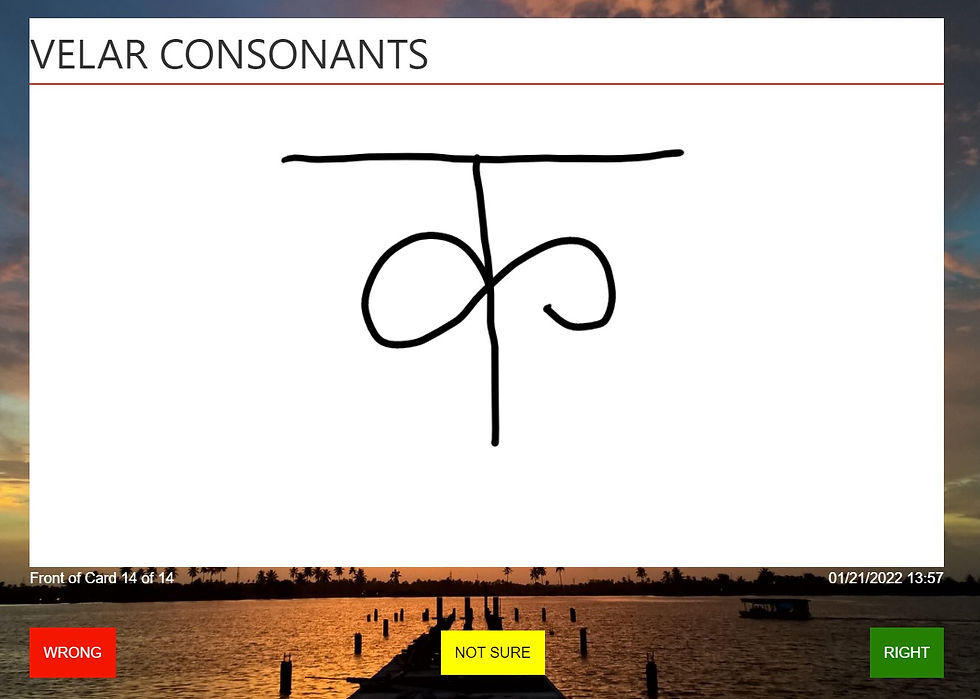
Anki’s power lies not just in its intuitive interface, but also in its sophisticated features that enhance the learning experience. By understanding and effectively utilizing these features, you can significantly boost your learning efficiency and retention. This section delves into Anki’s spaced repetition algorithm, customization options, review modes, search capabilities, organization methods, and import/export tools.Anki’s core strength is its intelligent approach to learning.
It adapts to your learning pace and memory retention patterns, providing personalized review schedules to optimize knowledge consolidation. The flexibility of Anki allows for tailoring your learning experience to your specific needs, making it a highly versatile tool.
Spaced Repetition Algorithm
Anki’s spaced repetition algorithm is a cornerstone of its effectiveness. It dynamically adjusts the intervals between reviews based on your performance, presenting cards when they are most likely to be recalled accurately. This proactive approach ensures that you don’t over-rely on memorization and helps to build long-term retention. The algorithm uses a complex calculation to determine the optimal time for each review, allowing you to focus your efforts on the concepts you need most.
Customizing Spaced Repetition Settings
Anki allows you to customize the parameters of its spaced repetition algorithm. This customization allows for tailoring the algorithm to your individual learning style and the specific material being studied. Modifying these settings allows for a more effective learning process. You can adjust parameters like the initial interval, the factor for increasing intervals, and the ease of learning factors to ensure a personalized learning path.
Review Modes
Anki offers various review modes, each with specific purposes. Understanding and using these different modes can enhance your learning experience. Each mode serves a distinct purpose, from basic review to more advanced testing scenarios.
- Card view: The standard review mode, allowing you to see the front and back of the card and answer based on the provided information.
- Self-testing: This mode prompts you to recall the answer from memory, without showing the front of the card. This strengthens memory recall.
- Review: This mode allows you to review cards based on their current review schedule, ensuring consistent reinforcement.
- All cards: This option lets you review all cards in your deck, regardless of their review schedule, useful for a quick refresher.
Search and Filtering
Anki’s search and filtering features allow for efficient navigation and retrieval of specific cards. These features make finding and reviewing relevant cards easier, saving time and effort. With these features, you can quickly pinpoint specific cards based on various criteria. You can search using s, tags, or even text within the front or back of cards.
Organizing Flashcards
Efficient organization of flashcards is crucial for effective learning. Anki provides tools to categorize and organize cards into decks and tags. This organization allows for targeted review and retrieval of specific information. Creating structured decks and tags is vital for managing your learning materials.
- Decks: Decks are collections of flashcards on a specific topic. Organize your cards logically, creating decks for each subject or area of study. This provides structure and facilitates focused review.
- Tags: Tags are s used to categorize flashcards within a deck. This enables more nuanced organization and efficient retrieval of specific cards, allowing for more detailed filtering and review. Tags can be used to group cards based on similar characteristics or concepts.
Export and Import Capabilities
Anki’s export and import functions allow for sharing and transferring your study materials. This feature is essential for transferring your study material across different devices or for collaboration.
- Exporting: You can export your Anki decks in various formats (e.g., HTML, CSV), allowing for backup, sharing, or import into other learning tools.
- Importing: Importing decks in different formats makes it easy to incorporate existing study materials into your Anki system. This enables easy integration of your study resources.
Advanced Techniques and Strategies
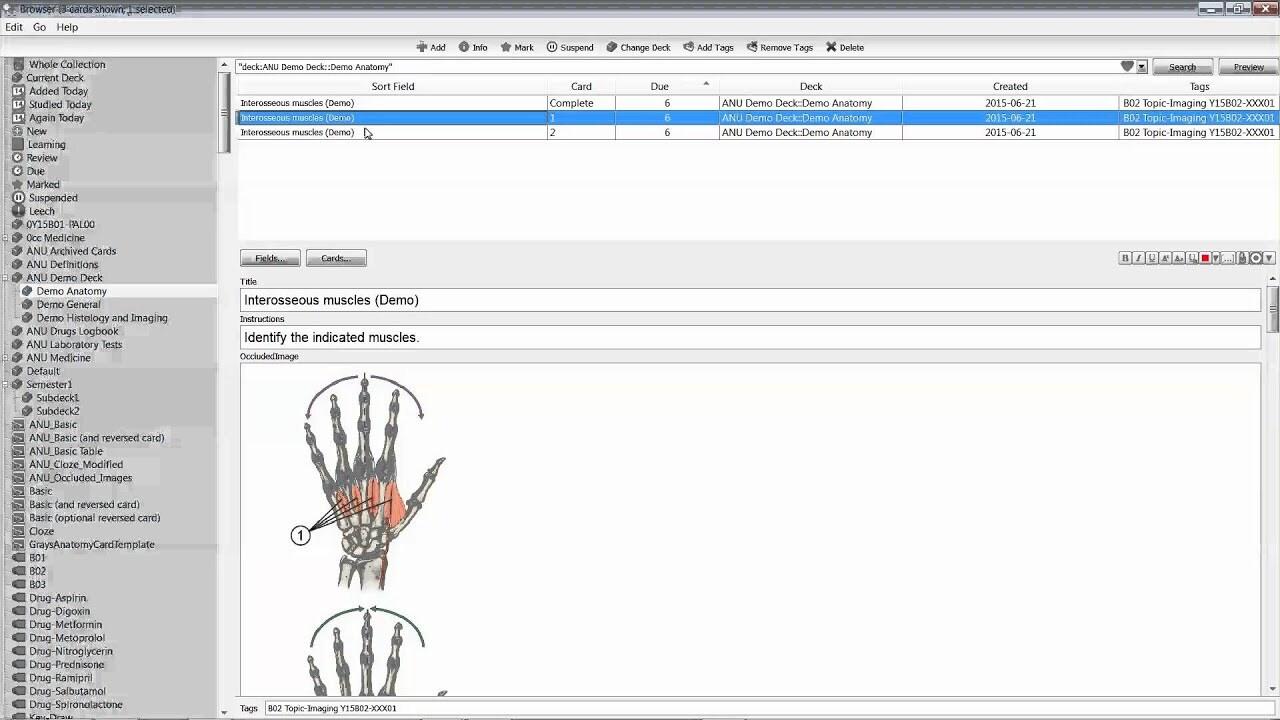
Mastering Anki goes beyond simply creating flashcards. Advanced techniques unlock deeper understanding and significantly improve memory retention. These strategies leverage various memorization methods, allowing for more efficient learning and recall. Employing these advanced techniques allows users to tailor Anki to their individual learning styles and enhance their overall learning experience.Effective use of advanced Anki techniques is crucial for maximizing the platform’s potential.
These techniques, such as incorporating context, mnemonics, and active recall, elevate Anki beyond a simple flashcard tool. They transform it into a dynamic and personalized learning environment that can adapt to different learning styles and cognitive preferences.
Advanced Memorization and Recall Techniques
Various methods optimize memory retention and recall. Spaced repetition, a cornerstone of Anki, is fundamental. By strategically adjusting review intervals, Anki helps consolidate learning and reinforce knowledge over time. Furthermore, active recall, the act of retrieving information from memory without looking at the answer, strengthens neural pathways. By prompting users to recall information, Anki fosters a deeper understanding and promotes long-term retention.
Adding Context to Flashcards for Enhanced Retention
Contextualizing information significantly improves retention. For example, associating a historical event with a relevant image, a person, or a specific location can enhance memory. Using Anki’s features, users can attach images, audio clips, or even videos to flashcards to provide visual and auditory cues. These contextual cues make the learning experience more engaging and memorable.
Incorporating Mnemonics and Memory Palaces into Anki
Mnemonics and memory palaces are powerful memory aids that can be effectively incorporated into Anki. A mnemonic device might involve creating a memorable phrase or acronym to represent a complex concept. For instance, to remember the order of planets in our solar system, an acronym could be used. Memory palaces, on the other hand, involve visualizing information in a familiar spatial layout, like a house or a room.
Anki allows users to embed images and custom fields, enabling users to develop and implement these memory aids. This strategy can enhance the memorization of complex lists, sequences, or factual information.
Tailoring Anki to Different Learning Styles
Anki is adaptable to various learning styles. Visual learners benefit from images and diagrams associated with flashcards. Auditory learners can incorporate audio clips or spoken explanations into their flashcards. Kinesthetic learners can create flashcards with interactive elements. The flexibility of Anki allows users to tailor their flashcards to align with their individual learning preferences.
Active Recall and Self-Testing with Anki
Active recall and self-testing are integral to effective learning. Anki’s design facilitates these practices. The platform’s review system naturally incorporates active recall, encouraging users to retrieve information from memory. The frequency of review is dynamically adjusted based on the user’s performance, creating a system of self-testing. Using Anki for self-testing and practice questions strengthens knowledge and helps identify areas needing further study.
Incorporating Practice Questions and Exercises
Anki can be used to create practice questions and exercises. Users can include questions in different formats within their flashcards, like multiple-choice, fill-in-the-blank, or short answer. This allows for a more interactive learning experience. Moreover, users can create custom fields to track progress, identifying areas that require further attention and practice. This approach facilitates a deeper understanding of the material and reinforces the concepts learned.
Advanced Anki Customization
Anki’s power extends beyond its core functionality. Advanced customization allows users to tailor Anki to their specific learning needs and preferences, making it an even more effective tool. This section delves into various customization options, from modifying themes to creating custom fields and adding powerful add-ons.
Anki Customization Options
Anki offers a wide array of customization options to personalize the learning experience. These options can be categorized into several key areas, including themes, add-ons, custom fields, and CSS styling.
| Category | Description |
|---|---|
| Themes | Pre-designed visual styles for Anki’s interface. |
| Add-ons | External tools that extend Anki’s core functionality. |
| Custom Fields | User-defined fields to store additional information with flashcards. |
| CSS Styling | Customizable styles for the Anki interface to match user preferences. |
Anki Themes and Customization
Anki’s default themes provide a basic visual framework. Users can easily change the look and feel of their Anki interface using different themes. These themes affect colors, fonts, and layout elements. The customization options within themes vary, often allowing users to select specific colors, fonts, and layout elements.
| Theme | Description | Customization Options |
|---|---|---|
| Default | Standard Anki theme. | Limited customization options; primarily color adjustments. |
| Dark | Darker color scheme. | Color adjustments, font styles, potentially layout options. |
| Custom | Themes created by users or community members. | Extensive customization possibilities. |
Anki Add-ons and Functionalities
Add-ons are vital for extending Anki’s functionalities. They offer specialized tools to enhance the learning process.
| Add-on | Functionality |
|---|---|
| AnkiConnect | Connects Anki with other applications and services. |
| AnkiScheduler | Provides various scheduling options for flashcards. |
| AnkiExporter | Allows for exporting flashcards to other formats. |
Creating Custom Fields
Custom fields allow users to add specific data to flashcards beyond the default fields. This is a valuable tool for storing additional details relevant to the learning process. To create custom fields, users navigate to the Anki browser and then modify the settings. The field names, types, and other settings can be adjusted.
Examples of Advanced Anki Add-ons
Some advanced add-ons automate tasks, enhance learning, or integrate Anki with other tools.
- AnkiConnect: Facilitates integration with other applications, enabling users to import/export data, such as importing data from PDF files or spreadsheets.
- AnkiScheduler: Offers flexible scheduling options for flashcards, potentially optimizing learning by adjusting the review intervals based on user-defined criteria.
Adding Custom CSS Styles to Anki
Users can add custom CSS styles to Anki to modify the appearance of the interface. This allows them to customize the colors, fonts, and layout to match their preferences or specific needs. It’s essential to understand Anki’s CSS structure and syntax to achieve the desired results. Users can create a new CSS file and then apply it to the Anki settings.
Troubleshooting and Optimization
Anki, while a powerful tool, can occasionally encounter issues. Understanding common problems and optimization techniques allows for a smoother learning experience. This section details strategies to identify, resolve, and prevent problems, ensuring optimal performance regardless of the learning environment or device.Effective troubleshooting involves identifying the root cause of a problem. By systematically examining potential causes, users can more efficiently resolve issues.
Optimization, in contrast, focuses on fine-tuning Anki to maximize efficiency and minimize performance bottlenecks. This includes adapting to different learning environments and devices, ensuring data security, and maintaining smooth interactions with other software.
Common Anki Issues and Troubleshooting
Anki’s stability and responsiveness can be affected by various factors. Potential issues include slow loading times, unexpected crashes, and difficulties accessing or modifying data. Troubleshooting these issues often requires a methodical approach.
- Slow Loading Times: Check for large or complex decks, excessive add-ons, or insufficient system resources. Closing unnecessary programs and allocating more RAM can often resolve this issue.
- Unexpected Crashes: Examine recent changes in Anki configuration, particularly add-ons or updates. If a specific add-on is suspected, temporarily disabling it can pinpoint the source of the problem. Ensure sufficient system resources are available.
- Data Access Problems: Confirm the correct file path for Anki’s database. Issues with file permissions or corrupted files might also hinder access. Backing up and restoring data is a crucial preventive measure.
Identifying and Resolving Anki Performance Problems
Performance issues can stem from various factors, including hardware limitations, excessive add-ons, or poorly structured decks.
- Hardware Limitations: If Anki is slow on a computer with limited RAM or processing power, consider upgrading or optimizing your system resources. Using a more powerful device will significantly improve performance.
- Excessive Add-ons: Many add-ons can enhance Anki’s functionality but also impact its performance. Disable unnecessary add-ons to isolate potential problems. Identify which add-ons are causing slowdowns and choose the ones that provide the most benefit.
- Poorly Structured Decks: Overly complex or redundant cards can lead to performance issues. Review and simplify the structure of your decks to improve efficiency.
Optimizing Anki for Different Learning Environments and Devices
Optimizing Anki for different contexts ensures a seamless learning experience. This includes adjusting settings for mobile devices and adapting to specific learning environments.
- Mobile Devices: Use the mobile Anki app for on-the-go learning. Ensure the app is optimized for your device and consider adjusting settings to minimize resource usage.
- Different Learning Environments: Adapt Anki’s settings to fit different learning environments, such as classrooms or libraries. Adjust the study mode and review schedule to match the available time and location.
Backing Up and Restoring Anki Data
Regular data backups are crucial for protecting against data loss. Implementing a backup strategy safeguards your learning progress and ensures continuity.
- Regular Backups: Create backups of your Anki database regularly, ideally daily or weekly. This is essential for disaster recovery. Use an external hard drive or cloud storage.
- Restoring Data: If data is lost or corrupted, restoring from a backup is the primary recovery method. Follow the restoration procedures Artikeld in the Anki documentation.
Recovering Lost or Corrupted Anki Data
Data loss can occur due to various reasons, including system failures or accidental deletions. Recovery strategies should be proactive and preventative.
- Using Backups: Prioritize restoring from a backup if data is lost or corrupted. This is the most reliable recovery method.
- Data Recovery Software: Data recovery software can potentially recover deleted or corrupted files, but its effectiveness varies.
Resolving Conflicts with Other Software or Applications
Conflicts between Anki and other applications can lead to instability or unexpected behavior. Understanding potential sources of conflicts is essential.
- Identifying Conflicts: Pay close attention to errors or warnings that Anki or other applications might display. Observe any unusual behavior in either program. If Anki’s performance or other software is affected, investigate the issue.
- Compatibility Issues: Ensure Anki is compatible with other software and operating systems. Update Anki and related software to resolve compatibility issues.
Real-World Applications
Anki’s versatility extends far beyond rote memorization. This section explores how Anki can be a powerful tool for diverse learning scenarios, transforming the way you approach various subjects and concepts. From language acquisition to scientific understanding, Anki offers a structured and engaging method for knowledge retention.
Language Learning and Vocabulary Acquisition
Anki excels in language learning by enabling a systematic approach to vocabulary building. Flashcards can be designed with the target language word on one side and its definition, pronunciation, and example sentences on the other. Regular review using spaced repetition ensures the vocabulary is ingrained in long-term memory. Visual aids, such as images or audio recordings, further enhance understanding and recall.
Using Anki for language learning involves creating decks with new words, phrases, and grammar rules, categorized for effective retrieval. Example: A Spanish learner might create a deck focusing on common verbs, incorporating audio recordings for pronunciation practice.
Memorizing Historical Dates and Facts
Historical timelines and events are best grasped through structured learning. Anki’s flashcards allow for the creation of highly organized historical timelines. One side of the card can display the date, while the other contains the associated event, key figures, and relevant context. Spaced repetition will reinforce the memory of significant dates and their importance in the broader historical narrative.
Creating detailed historical timelines in Anki allows for the interlinking of related events and individuals.
Using Anki for Scientific Concepts and Formulas
Scientific concepts and formulas are more effectively retained when linked to concrete examples. Anki flashcards can include the formula on one side and its derivation, explanation, and practical applications on the other. Using images and diagrams can help visualize abstract concepts. Example: A physics student might create a deck for Newton’s Laws of Motion, including examples of their application in real-world scenarios.
This method ensures the student understands the formula and its implications, making it easier to recall and apply.
Using Anki for Studying Different Subjects
Anki is a flexible tool applicable to diverse subject matters. For instance, in mathematics, flashcards can include theorems, proofs, and practice problems. In literature, flashcards could pair literary devices with their definitions and examples from specific texts. Biology students could use Anki to create flashcards that associate biological processes with their corresponding diagrams. This approach is crucial in ensuring a holistic understanding of different subjects.
Table of Specific Learning Topics
| Learning Topic | Example Flashcard Content |
|---|---|
| Mathematics | Formula: Area of a circle = πr2 Explanation: Derivation and application in various problems. |
| History | Date: 1492 Event: Columbus’s arrival in the Americas Context: Impact on European colonization and the Americas. |
| Languages (e.g., French) | Word: “Bonjour” Meaning: Hello Pronunciation: [Pronunciations] Example: “Bonjour madame.” |
| Chemistry | Formula: H2O Name: Water Properties: Physical and chemical properties. |
Conclusive Thoughts

In conclusion, this guide has provided a comprehensive overview of Anki’s capabilities for creating powerful digital flashcards. We’ve covered everything from foundational principles to advanced techniques, empowering you to design effective study materials, customize your learning experience, and optimize your learning outcomes. By understanding and applying the strategies Artikeld in this guide, you can unlock the full potential of Anki and achieve greater learning success.
Whether you’re a language learner, history enthusiast, or science student, Anki offers a versatile and powerful tool to enhance your understanding and memory retention.